

Blog
How do manufacturers improve cutting accuracy of knife cutting machines?

How do manufacturers improve cutting accuracy of knife cutting machines?
Many manufacturers find their cutting machines gradually lose precision after months of use. Promised accuracy of ±0.1mm becomes ±0.5mm or worse, causing rejected parts and production delays. This accuracy drift creates urgent pressure to restore machine performance.
Improving cutting accuracy requires diagnosing the root cause first—whether mechanical wear, tool-material mismatch, or fixation failure—then applying the right fix. In most cases I've handled with automotive interior and gasket manufacturers, worn linear guides and blade-material mismatches cause more accuracy problems than control software issues.
I work as technical support engineer at Realtop, and I regularly receive calls from frustrated production managers who say their machine "lost accuracy." After visiting dozens of factories and diagnosing accuracy failures on-site, I learned that most people misunderstand what cutting accuracy actually means and where problems really come from.
What causes cutting accuracy to decrease over time?
Cutting accuracy problems frustrate manufacturers because the machine worked perfectly when new. Parts fit assembly jigs precisely, and customers accepted every batch. Then slowly, tolerances drift beyond acceptable limits, and nobody knows why.
Accuracy degradation happens when mechanical components wear out, tooling becomes unsuitable for materials, or workpiece fixation fails. These three failure modes create different error patterns that need different solutions.
Understanding accuracy versus repeatability
Many customers tell me their machine has "±0.1mm repeatability" and expect this number to guarantee cutting accuracy. This creates confusion when actual cut parts show ±0.5mm variation. The problem comes from mixing two different measurements.
Repeatability measures whether the machine returns to the same position when commanded multiple times under no-load conditions. We test this by moving the cutting head to a point, measuring its position, then commanding it to return 10 times and measuring each position. If all measurements fall within ±0.1mm, we call this "±0.1mm repeatability."
Cutting accuracy measures the dimensional precision of actual cut parts. This includes material behavior, blade sharpness, suction force, thermal expansion, and workpiece movement during cutting. A machine with ±0.1mm repeatability often produces parts with ±0.3mm accuracy because cutting forces, material elasticity, and fixation quality add their own errors.
In the cases I've handled, customers who understand this difference diagnose problems faster. When they see accuracy drift, they check mechanical wear first, not software settings. When they see consistent offset errors, they examine material fixation, not motion control parameters.
| Error Type | Cause Category | Typical Symptom | First Diagnostic Step |
|---|---|---|---|
| Random variation ±0.5mm | Mechanical wear | Different error each cut | Check linear guide play |
| Consistent offset 0.3mm | Material behavior | Same direction error | Test blade-material match |
| Corner rounding | Speed too high | Curves replace sharp corners | Reduce cutting speed |
| Workpiece shift | Suction failure | Entire pattern moves | Check vacuum pressure |
Mechanical wear patterns I see most often
After diagnosing accuracy problems at automotive interior suppliers and gasket manufacturers, I found that worn mechanical components cause most accuracy failures. These parts degrade gradually, so accuracy drifts slowly rather than failing suddenly.
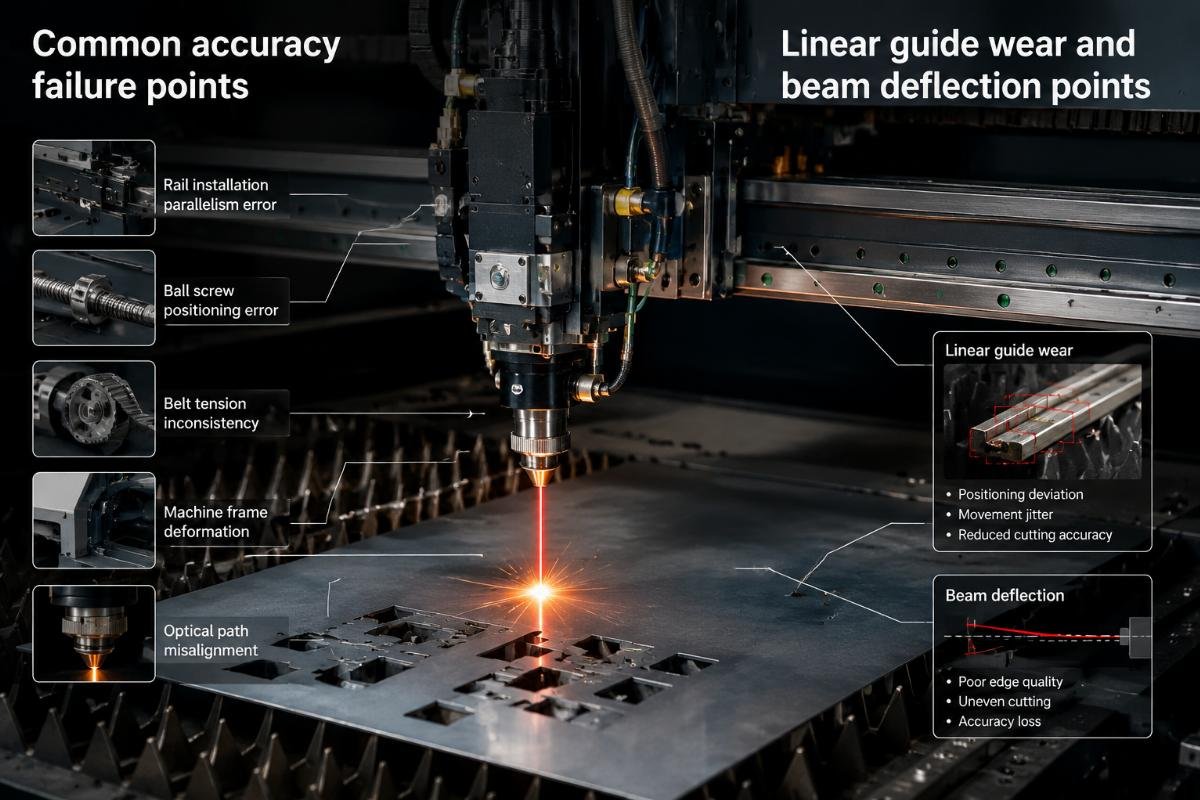
Linear guide rails develop play when steel balls wear down their raceways. I test this by gently pushing the cutting beam perpendicular to its travel direction. New machines show zero movement. Worn machines let me push the beam 0.2mm or more. This play adds directly to cutting error because the beam position becomes uncertain.
Timing belts stretch and develop slack between the motor pulley and driven pulley. Some customers run machines 16 hours daily for two years without replacing belts. The belt pitch elongates, creating backlash when the motor reverses direction. I measure this by commanding a 10mm forward move, then 10mm reverse, then measuring actual position. Backlash shows as the difference between commanded zero and actual position.
Beam deflection happens when the gantry beam sags in the middle under its own weight plus cutting force. Long machines (over 2 meters) show this more than compact ones. I place a straight edge along the beam while the machine sits idle, then compare when the cutting head sits at center span. Some beams deflect 0.5mm at center, which directly reduces cutting accuracy at that position.
Ball screw wear creates positioning errors that increase with travel distance. I test this by cutting identical circles at different positions across the work area. If circles at far positions show larger diameter errors than circles at near positions, ball screw wear usually causes this pattern.
How do blade and material interactions affect accuracy?
Many manufacturers assume that once they set cutting depth correctly, blade choice doesn't matter much. This assumption breaks down when processing different material types, especially elastic materials like foam, rubber, or multilayer composites.
Blade sharpness, blade angle, and material stiffness determine whether the machine cuts cleanly or crushes and deforms material. Elastic materials rebound after cutting, shifting final dimensions away from the programmed path.

Blade wear progression I observe in production
In one gasket manufacturing case, the customer reported gradually increasing dimensional errors over three weeks. They checked mechanical components and found no play in linear guides. Vacuum pressure tested normal. Software parameters matched factory settings.
I visited their facility and watched the machine cut rubber gaskets. The blade still penetrated the material and completed cuts, but cut edges showed compressed zones rather than clean shear. When I examined the blade under magnification, the cutting edge showed visible rounding where sharp geometry should exist.
We replaced the blade with a fresh one and cut test parts. Accuracy immediately improved from ±0.4mm back to ±0.15mm. The customer had processed 50,000 parts with one blade, far exceeding the reasonable blade life for their abrasive rubber compound.
Blade wear affects accuracy in specific ways that help diagnose the problem. Dull blades require more cutting force, which deflects the beam and shifts the cutting head position. Dull blades compress material before cutting, creating elastic deformation that rebounds after the blade passes. This rebound moves the final cut edge away from the programmed position.
Different materials wear blades at different rates. Customers who cut fiberglass-reinforced composites replace blades every 5,000 parts. Customers who cut plain textile fabrics run 100,000 parts per blade. I recommend tracking blade life for each material type rather than using a universal replacement schedule.
Material stiffness and cutting force balance
Soft, elastic materials behave differently under cutting force than rigid materials. When processing automotive interior foam or carpet, I see accuracy problems that don't appear when cutting cardboard or thin plastics.
Foam and rubber materials compress ahead of the blade rather than shearing cleanly. This compression zone creates local material deformation that springs back after cutting. If the machine cuts a 100mm diameter circle in foam, the final part might measure 100.3mm because material rebound adds 0.15mm on each side.
Multilayer materials create accuracy challenges because each layer has different stiffness. When cutting automotive headliner that combines foam backing, fabric face, and adhesive film, the blade encounters three different materials in one cut. If blade depth or cutting speed suits one layer but not others, some layers cut cleanly while others crush or tear, creating ragged edges that fall outside tolerance.
I recommend test cuts on production materials before setting final parameters. Cut simple shapes like 50mm squares and measure actual dimensions compared to programmed dimensions. The difference reveals whether current blade and speed settings match material properties.
| Material Type | Typical Rebound | Recommended Blade Angle | Cutting Speed Range |
|---|---|---|---|
| Textile fabric | 0.05-0.1mm | 45° angle blade | 800-1200mm/s |
| Foam rubber | 0.2-0.5mm | 52° angle blade | 400-600mm/s |
| Leather | 0.1-0.15mm | 30° angle blade | 600-800mm/s |
| Cardboard | <0.05mm | 45° angle blade | 1000-1500mm/s |
| Composite with fiberglass | <0.05mm | Carbide blade | 300-500mm/s |
Cutting depth calibration mistakes
Many accuracy problems trace to incorrect blade depth settings. Customers often set depth by visual inspection or by cutting until the blade just penetrates the backing material. This approach creates inconsistent results because material thickness varies and backing materials compress under blade force.
I recommend setting blade depth based on material cutting resistance rather than visual penetration. The blade should extend below material surface by 0.3-0.5mm for most flexible materials. This depth provides clean cutting without excessive force that might deflect the beam or compress the material.
Some customers set blade depth too deep, thinking this guarantees complete cutting. Excessive depth drives the blade into the backing board, which dulls the blade quickly and creates unnecessary cutting force. This force deflects mechanical components and reduces accuracy.
Testing blade depth involves cutting a straight line, then examining the cut edge. A proper cut shows clean separation with minimal compression zone. Too-shallow cuts leave material fibers connecting across the cut. Too-deep cuts show crushed material at the cut bottom and excessive wear marks on the backing board.
How does workpiece fixation impact cutting accuracy?
Accurate cutting requires the workpiece to remain completely stationary during processing. Even small material movement creates dimensional errors because the machine follows a programmed path while the material moves relative to the cutting table.
Workpiece movement happens when vacuum suction fails, material surface resists airflow, or cutting forces exceed fixation forces. Production materials like leather, coated fabrics, and smooth plastics create fixation challenges that don't appear in test cutting with paper.
Vacuum system problems I diagnose regularly
One automotive interior supplier contacted me about accuracy problems when cutting dashboard covering material. Test cuts with thin fabric showed perfect accuracy, but production material showed random errors up to 1mm. The pattern of errors changed from part to part with no consistent direction.
I visited their facility and observed production cutting. Their material had vinyl coating on one side and foam backing on the other. The vinyl side was very smooth and somewhat resistant to airflow. They placed material with vinyl side down against the vacuum table.
I asked them to place material with foam side down instead. Foam allows airflow to penetrate easily, creating stronger vacuum hold. After changing material orientation, accuracy immediately improved. The random errors disappeared because material no longer shifted during cutting.
Vacuum hold depends on airflow through the material into the vacuum plenum below. Materials with very smooth surfaces, waterproof coatings, or low porosity resist airflow and reduce vacuum force. Materials with texture, fabric structure, or foam composition allow easy airflow and achieve strong vacuum hold.
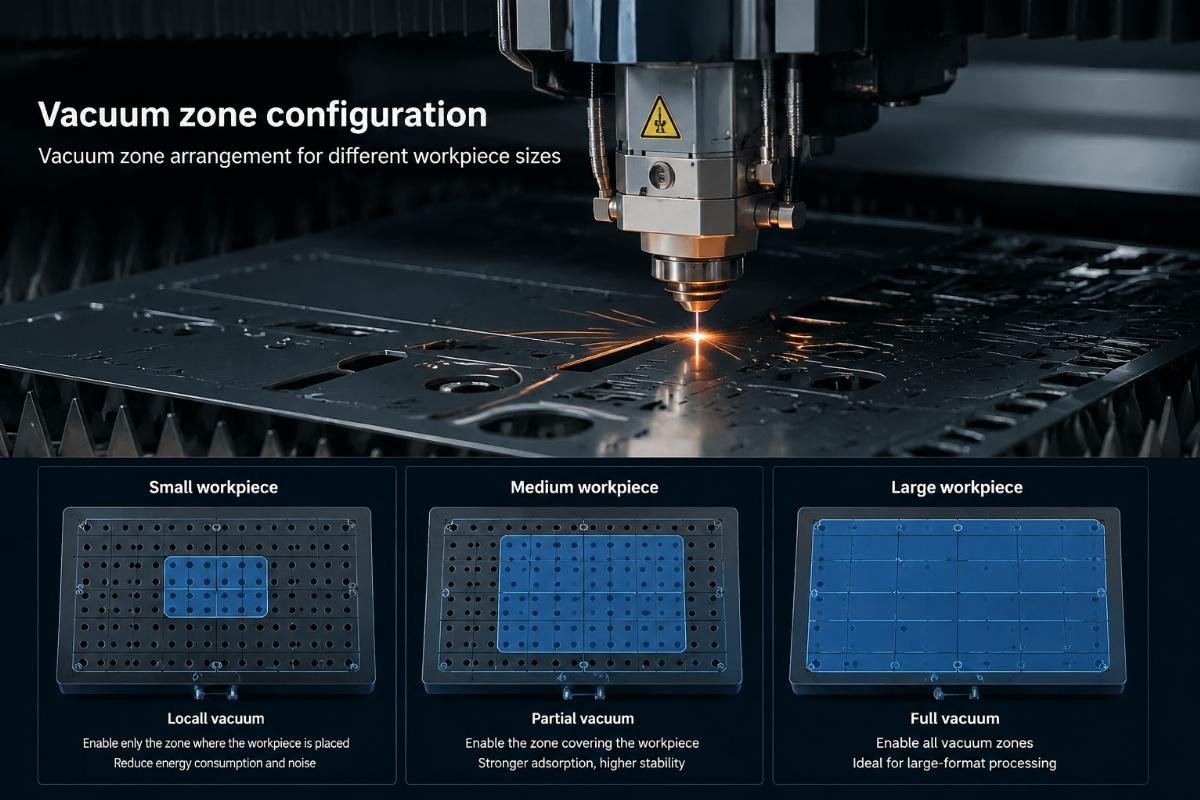
Vacuum table design affects fixation quality. Tables with many small vacuum zones create better hold than tables with few large zones. Small zones concentrate vacuum force where material actually sits, while large zones waste suction pulling air from empty table areas.
I recommend testing vacuum hold by placing material on the table, starting vacuum, then manually trying to slide the material. Good fixation prevents any sliding even with moderate hand force. Poor fixation lets material shift easily, indicating inadequate vacuum pressure or material-table mismatch.
Material preparation before cutting
Surface cleanliness affects vacuum hold more than most customers expect. Dust, lint, or residue on either the material back surface or the table surface blocks airflow and reduces vacuum force. I've diagnosed accuracy problems that completely resolved after cleaning the vacuum table.
Material moisture content changes vacuum performance. Damp materials sometimes achieve better vacuum hold because moisture helps seal the material-table interface. Very dry materials might require light misting to improve fixation, especially materials with rough back surfaces.
Material curl or waviness prevents flat contact with the table. Rolled materials often retain curl memory, creating gaps between material and table that break vacuum seal. I recommend unrolling material and letting it relax for several hours before cutting, or using edge weights to flatten material before starting vacuum.
Some materials need additional fixation beyond vacuum alone. Very thick, stiff materials might not conform to table surface enough for good vacuum hold. Very slippery materials might overcome vacuum friction during high-speed cutting. In these cases, edge clamps or mechanical hold-downs supplement vacuum fixation.
What maintenance procedures prevent accuracy degradation?
Systematic maintenance keeps cutting accuracy stable over time rather than letting it degrade until accuracy failures force emergency repairs. I help customers develop maintenance schedules based on their production volume and material types.
Regular lubrication, cleaning, and component inspection catch wear before it affects accuracy. Checking mechanical play, testing vacuum pressure, and measuring actual cutting results create early warning of developing problems.
Mechanical inspection intervals
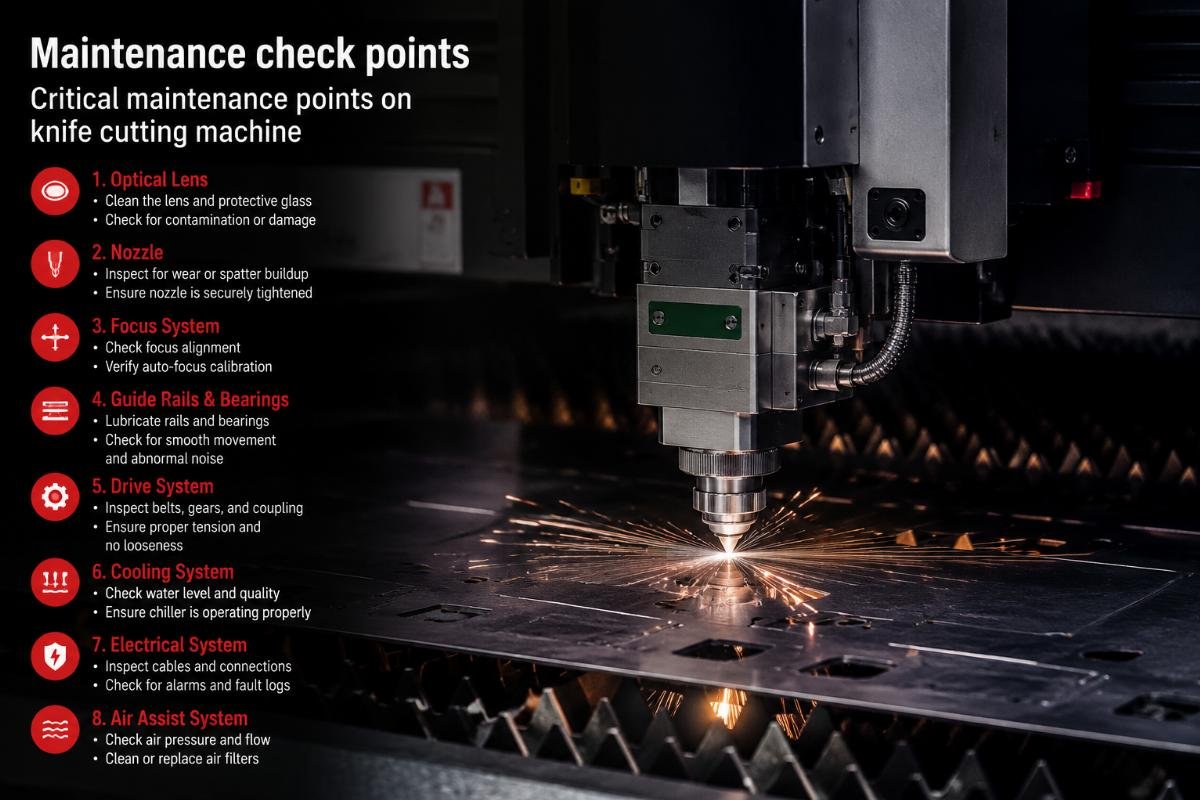
Linear guide rails need cleaning and lubrication based on operating hours and environmental conditions. Dusty environments or long daily operation require more frequent service. I recommend checking linear guides every 500 operating hours for most production environments.
Inspecting guides involves cleaning old lubricant, checking for ball bearing damage, measuring play in all directions, and applying fresh lubricant. If play exceeds 0.05mm, the guide rails need replacement soon. If play reaches 0.1mm, accuracy already suffers and replacement becomes urgent.
Timing belts need tension checking every 1000 operating hours. Belt tension affects positioning accuracy because loose belts create backlash during direction changes. I test tension by pressing the belt span between pulleys and measuring deflection. Proper tension shows about 10mm deflection under moderate finger pressure. More deflection indicates the belt needs tensioning or replacement.
Ball screws need backlash testing every 2000 operating hours. Testing involves commanding forward movement, then reverse movement, then measuring position error. If backlash exceeds 0.1mm, the ball screw needs either adjustment or replacement depending on wear condition.
Tool and consumable replacement tracking
I recommend tracking blade life by part count rather than by time because cutting action wears blades, not idle time. Different materials wear blades at different rates, so maintaining separate count records for each material type helps predict replacement timing.
Starting a blade log book helps identify patterns. Record date installed, material type, part count, and reason for replacement. After several blade cycles, patterns emerge showing typical blade life for each material. This data prevents premature replacement that wastes tooling cost and prevents late replacement that degrades accuracy.
Backing boards need replacement when they show excessive cut marks, uneven surface, or deep scoring. Worn backing boards fail to provide firm support beneath the workpiece, letting material deflect during cutting. I recommend flipping or replacing backing boards every 100,000 cuts or when visual inspection shows significant wear.
Vacuum pump filters need cleaning monthly or when vacuum pressure drops below specification. Clogged filters reduce airflow and vacuum force, which lets workpieces shift during cutting. Filter maintenance takes only minutes but prevents accuracy problems that might take hours to diagnose.
Calibration and testing procedures
Regular accuracy testing catches degradation before it affects production parts. I recommend cutting standard test patterns weekly and measuring results against baseline dimensions. Simple test patterns include 100mm squares, 50mm circles, and straight lines of various lengths and directions.
Measuring test cuts reveals specific error patterns that guide diagnosis. Random errors suggest mechanical wear. Consistent offset errors suggest material-related problems. Scale errors (where 100mm programs cut 100.2mm) suggest belt stretch or motor settings. Corner rounding suggests excessive cutting speed.
Software calibration should come after mechanical inspection, not before. Many customers try adjusting software parameters first because this seems easier than mechanical repair. However, software cannot compensate for worn guides, stretched belts, or deflected beams. These mechanical problems need mechanical solutions.
I perform calibration only after confirming all mechanical components show acceptable play and wear. Calibration then fine-tunes positioning to account for dimensional variations between machine axes or to compensate for material-specific behavior. This sequence solves problems rather than hiding symptoms.
How do I implement effective troubleshooting workflow?
When accuracy problems appear, systematic troubleshooting finds root causes faster than random adjustments. I developed a diagnostic sequence from handling many accuracy complaints across different industries.
Start with mechanical inspection because worn components cause most accuracy failures. Then check tool-material matching because blade-material mismatches create predictable errors. Finally test fixation and process parameters because these affect accuracy without mechanical failure.
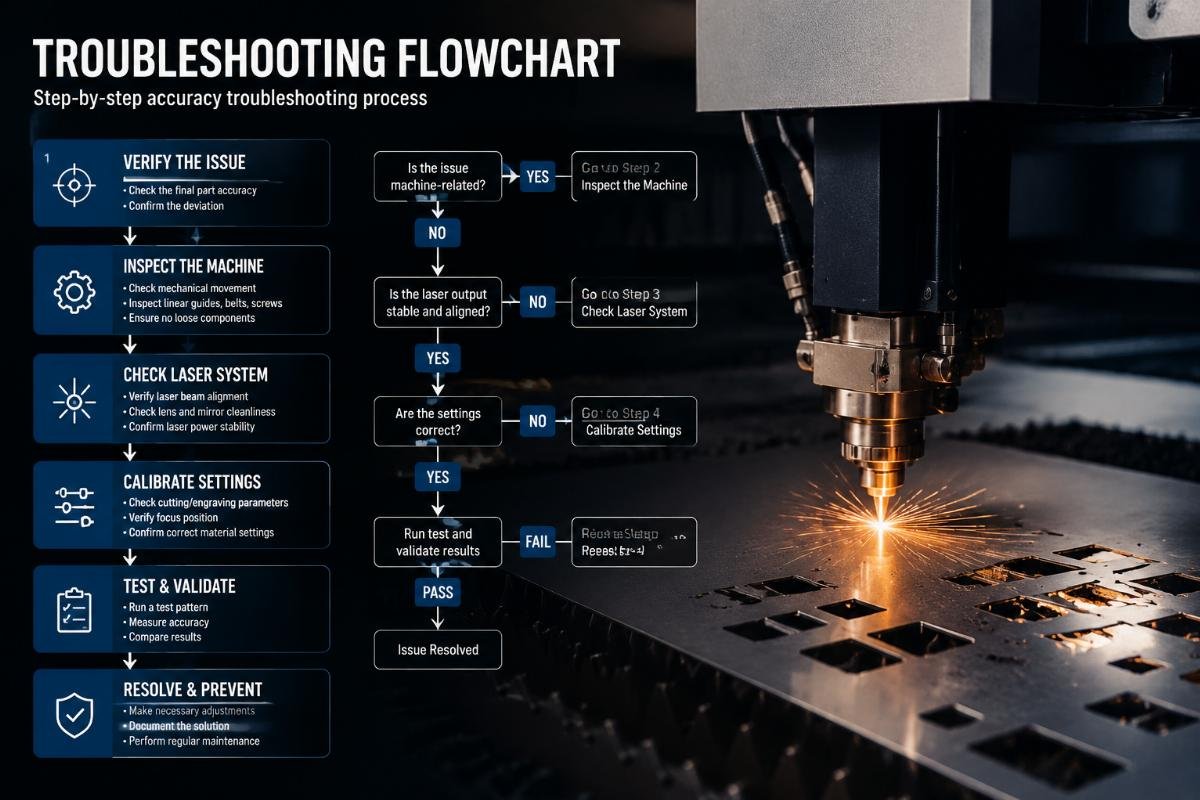
My diagnostic sequence for accuracy problems
First, I test mechanical play in all moving components. Push the cutting beam perpendicular to each axis of motion and feel for movement. Any noticeable play needs investigation. Check linear guides, bearing blocks, and beam mounting points. Document any play measurement so I can track whether it increases over time.
Second, I inspect the cutting tool. Remove the blade and examine the cutting edge under magnification. Look for rounding, chipping, or uneven wear. Compare blade condition to a new blade to judge remaining life. If blade wear appears significant, replace the blade and retest accuracy before continuing diagnosis.
Third, I verify vacuum fixation. Place test material on the table, start vacuum, and try to manually slide the material. If material moves easily, check vacuum pressure gauge, inspect table surface for debris, examine material back surface for contamination, and confirm material type suits vacuum fixation.
Fourth, I examine cut edges on actual parts. Clean cuts with minimal compression indicate good blade-material matching and proper depth. Crushed or torn edges indicate blade dullness, excessive speed, or