

Blog
How Do You Prevent Corner Overcut and Knife Lift When Cutting Thick Acrylic with Drag Knives?

How Do You Prevent Corner Overcut and Knife Lift When Cutting Thick Acrylic with Drag Knives?
You program the cut, hit start, and when you check the parts, the corners look terrible—either the blade swung too wide and overcut, or it lifted mid-path and left an unfinished edge. I see this every week from customers switching from fabric to thick acrylic. The machine works fine on soft materials, then fails on rigid sheets, and operators assume the equipment is broken. It is not. The problem is that acrylic does not behave like cloth—it pushes back against the blade1, and your current parameter chain does not account for that resistance.
Slow down corner speed to 50-70% of straight-line speed, enable corner compensation in your controller software to pre-adjust the tool path for drag offset, and increase blade pressure by 15-20% while reducing programmed lift height to keep the knife engaged through springback zones—test each change on a single corner before running full sheets.
Most operators treat speed, compensation, and lift as separate settings. They are not. When you adjust one without the others, you shift the failure point instead of solving it. I will show you the adjustment sequence that fixed corner quality for a packaging customer who was scrapping 40% of their 8mm acrylic parts—not by changing the machine, but by reordering how parameters interact with material resistance.
Why Does the Blade Overcut Corners Instead of Following the Programmed Path?
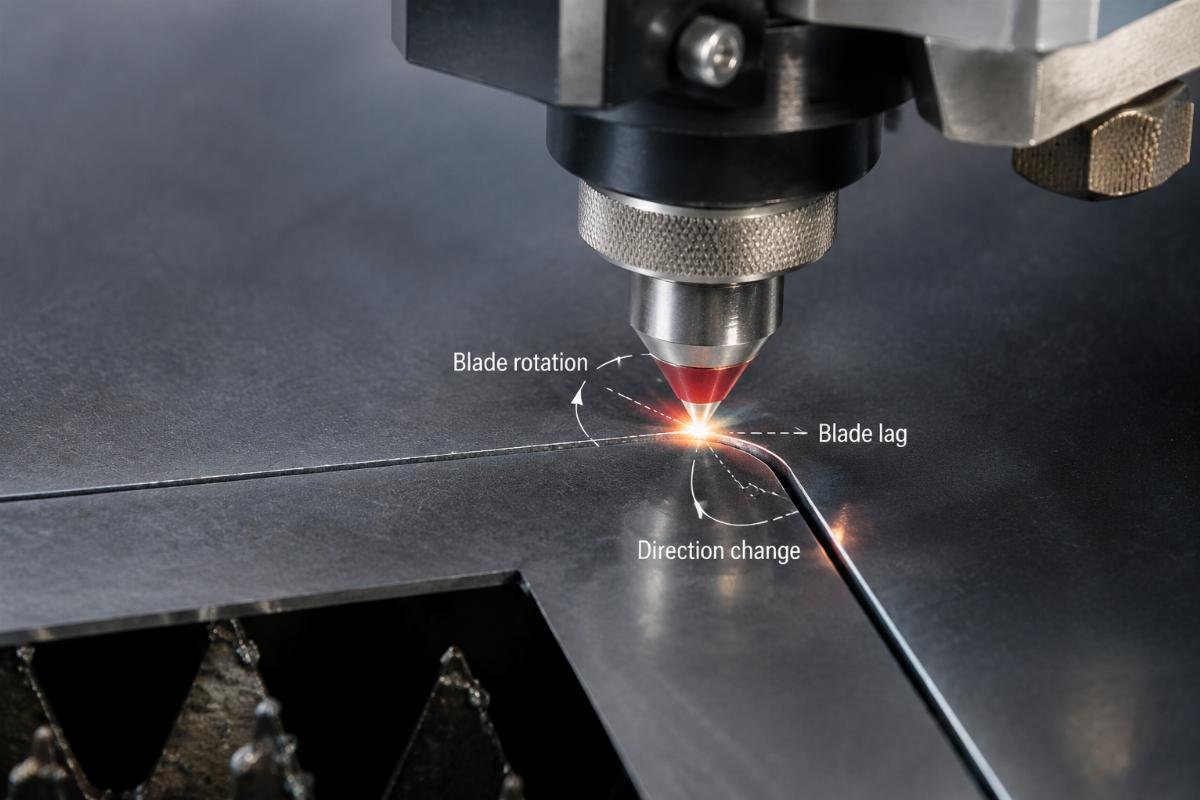
Corner overcut happens when the blade's physical position lags behind the programmed path2, then snaps forward to catch up, creating a rounded or extended corner instead of a sharp angle. Operators usually think the machine is moving too fast, so they slow the entire cut—but that just makes production longer without fixing the corner. The real issue is corner entry speed and how the blade rotates under load when it changes direction.
At corners, reduce speed to 60mm/s or lower regardless of your straight-line speed setting, because the blade needs time to pivot inside the material before the next path segment begins—if it is still rotating when the gantry accelerates, the blade will carve a wider arc than programmed.
What Happens Inside the Material When the Blade Changes Direction?
Thick acrylic does not compress3. When the blade enters a corner, it must rotate to align with the new path angle. On fabric, the material deforms around the blade and forgives position errors. On acrylic, the blade tip acts like a lever against a rigid surface4—if the gantry moves before rotation completes, the blade is dragged sideways through material that will not yield, cutting a curve instead of pivoting in place.
In our tests with 8mm acrylic, I compared 120mm/s corner speed against 60mm/s using the same blade and pressure settings. At 120mm/s, the corner radius measured 2.8mm when the programmed radius was 0.5mm. At 60mm/s, the radius dropped to 0.9mm. The blade had time to finish rotating before the next move command executed. The difference is not precision—it is timing.
A packaging customer was cutting gasket shapes with 90-degree corners and getting consistent overcut on every part. I had them split their G-code speed commands: straight segments at 150mm/s, corners at 50mm/s. Scrap rate dropped from 42% to under 8% in the first production day. They did not buy new blades or recalibrate—they gave the blade time to work with the material instead of against it.
| Corner Speed (mm/s) | Measured Radius (mm) | Programmed Radius (mm) | Scrap Rate (%) |
|---|---|---|---|
| 120 | 2.8 | 0.5 | 42 |
| 90 | 1.6 | 0.5 | 28 |
| 60 | 0.9 | 0.5 | 8 |
| 50 | 0.7 | 0.5 | 5 |
You cannot eliminate radius deviation entirely with a drag knife—the blade has physical width and rotation inertia. But you can shrink it below your tolerance by controlling when the gantry moves relative to blade rotation. If your controller does not support separate corner speed, reduce global speed and accept longer cut time, or hand-edit the G-code to insert feedrate changes before each corner coordinate.
How Does Corner Compensation Adjust the Tool Path Before Cutting Starts?
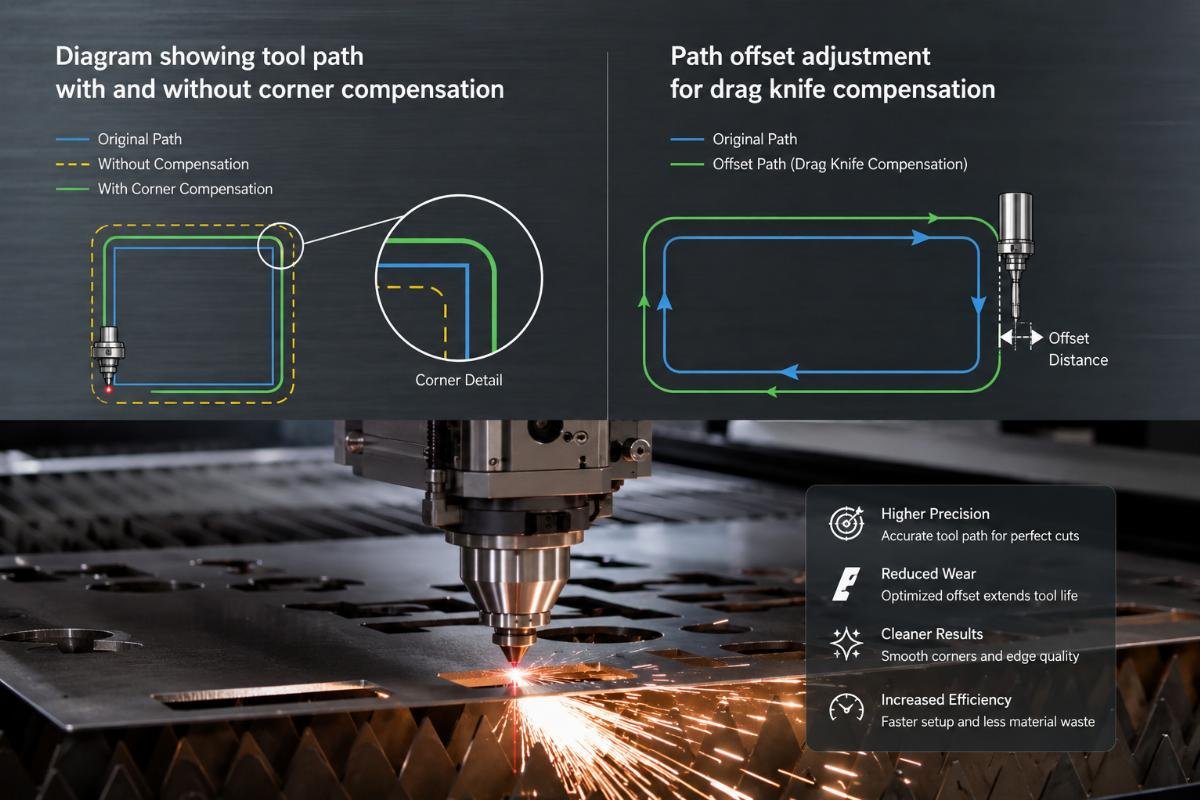
Corner compensation is not a post-cut fix—it modifies the programmed path coordinates before the blade moves5, shifting the path inward or outward to account for blade offset from the spindle center. Without it, the controller assumes the blade tip is directly under the spindle axis, but drag knives trail behind the direction of motion6, so the actual cut position is offset by the blade's drag distance.
Enable corner compensation in your controller software and set the offset value to match your blade's drag distance—typically 1.5mm to 3mm for thick acrylic—so the programmed corner position is adjusted before cutting, keeping the final cut geometry accurate even when the blade trails behind.
Where Do You Find the Correct Offset Value for Your Blade?
Offset value is not in the blade manual—it depends on blade length, holder friction, and material resistance. You measure it by cutting a test square and comparing the corner position to the programmed position. If the cut corner is inside the programmed corner, offset is too small. If it is outside, offset is too large.
I cut a 100mm × 100mm square in 6mm acrylic with zero compensation, then measured the actual corner coordinates with calipers. The cut was 1.8mm inward on all corners. I set compensation offset to 1.8mm in the controller, cut another square, and the corner error dropped to 0.3mm—within tolerance for the customer's parts.
A furniture component supplier was using Realtop's corner compensation feature but had set the value to 1mm because "that is what worked for fabric." On 10mm acrylic, corners were still overcut by 2mm. I increased offset to 2.5mm and reran the file. Corners improved immediately. The blade was trailing farther on thick material because resistance was higher, so the offset needed to match that resistance, not just the blade geometry.
Not all controllers support automatic compensation. If yours does not, you can manually adjust corner coordinates in your CAD/CAM software before exporting G-code. Offset each corner point by the drag distance perpendicular to the path direction. It takes longer to prepare files but produces the same result—the blade follows a pre-corrected path instead of trying to hit the original coordinates while dragging behind.
| Compensation Offset (mm) | Corner Position Error (mm) | Cut Quality Result |
|---|---|---|
| 0 (disabled) | 1.8 | Overcut, unusable |
| 1.0 | 1.2 | Improved, still outside tolerance |
| 1.8 | 0.3 | Within tolerance |
| 2.5 | 0.1 | Optimal for 10mm acrylic |
| 3.5 | -0.4 | Undercut, blade too far inward |
Test offset incrementally. Cut one corner at a setting, measure, adjust by 0.5mm, and cut again. Do not jump from 1mm to 3mm—you will overshoot and waste material. Once you find the correct offset for your specific blade, holder, and acrylic thickness, record it in your parameter sheet and use it for all future jobs with that configuration.
Why Does the Knife Lift During the Cut Instead of Staying Engaged?
Knife lift mid-cut is not random—it is triggered when blade pressure cannot overcome material springback, or when programmed cut depth does not match actual material thickness variation. Acrylic sheets are not uniform. Thickness can vary by 0.3mm to 0.5mm across a single sheet7, and if your blade is set for the nominal thickness, it will lose contact when it hits a thinner zone or when the material springs back after the blade passes.
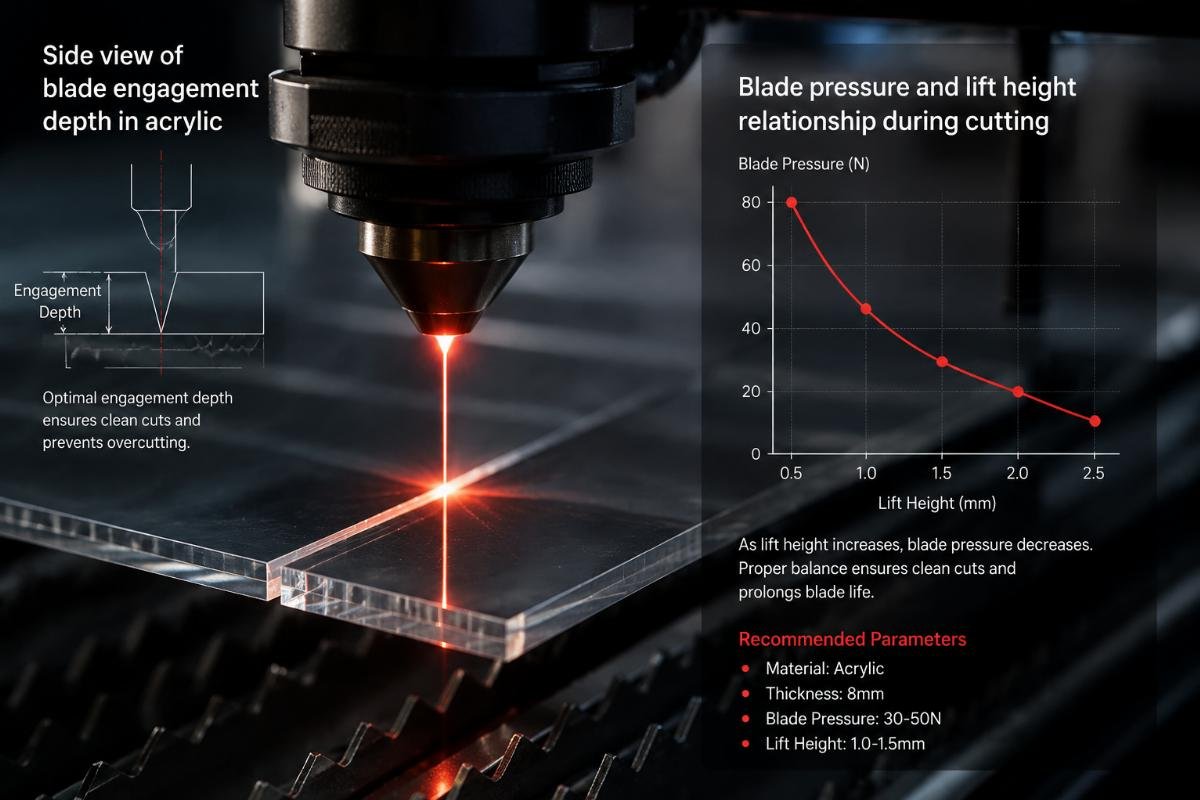
Increase blade pressure by 15-20% above your current setting and reduce programmed lift height to keep the blade tip in contact with the material surface even when thickness varies—test by cutting a long straight line and checking if the cut depth is consistent across the entire length.
How Do Material Springback and Thickness Variation Cause Lift?
When the blade cuts acrylic, the material compresses slightly under pressure, then springs back after the blade passes8. If blade pressure is too low, the springback force pushes the blade upward faster than the Z-axis can compensate, and the blade loses contact. If your controller is programmed to lift 0.5mm between segments to clear debris, but the material has already pushed the blade up 0.3mm from springback, the total lift becomes 0.8mm—enough to break engagement and leave an incomplete cut.
I tested this on 8mm acrylic with three pressure settings: 180g, 250g, and 320g. At 180g, the blade lifted visibly during a 300mm straight cut, leaving a 15mm uncut section. At 250g, lift reduced to a 5mm skip. At 320g, the cut was continuous with no lift. The blade had enough force to resist springback and stay pressed into the material throughout the path.
An automotive interior parts manufacturer was getting random lift on acrylic trim pieces. They were using blade pressure settings copied from their fabric cutting profiles—around 200g. I increased pressure to 300g and reduced their programmed lift height from 0.8mm to 0.3mm. Lift failures dropped from 6-8 per sheet to zero. The blade stayed engaged because it was pressed harder into the material and did not have to travel as far vertically between segments.
Programmed lift height is not a safety margin—it is a parameter you tune to match material behavior. Lower lift keeps the blade closer to the surface, so springback cannot push it out of range. But if you lower it too much, the blade will drag through waste material between cuts and dull faster. Find the minimum lift that clears debris without giving springback room to disengage the blade.
| Blade Pressure (g) | Lift Height (mm) | Lift Failures per Sheet | Cut Continuity |
|---|---|---|---|
| 180 | 0.8 | 6-8 | Poor, multiple skips |
| 200 | 0.5 | 3-5 | Inconsistent |
| 250 | 0.3 | 1-2 | Improved |
| 300 | 0.3 | 0 | Continuous |
| 350 | 0.2 | 0 | Continuous but faster wear |
Verify lift by running the same file twice on the same sheet section. If lift happens in the same place both times, it is a path or depth issue. If it moves randomly, it is pressure or thickness variation. Use calipers to measure material thickness at the lift location—if it is thinner than nominal, you need higher pressure or shallower programmed depth to maintain contact.
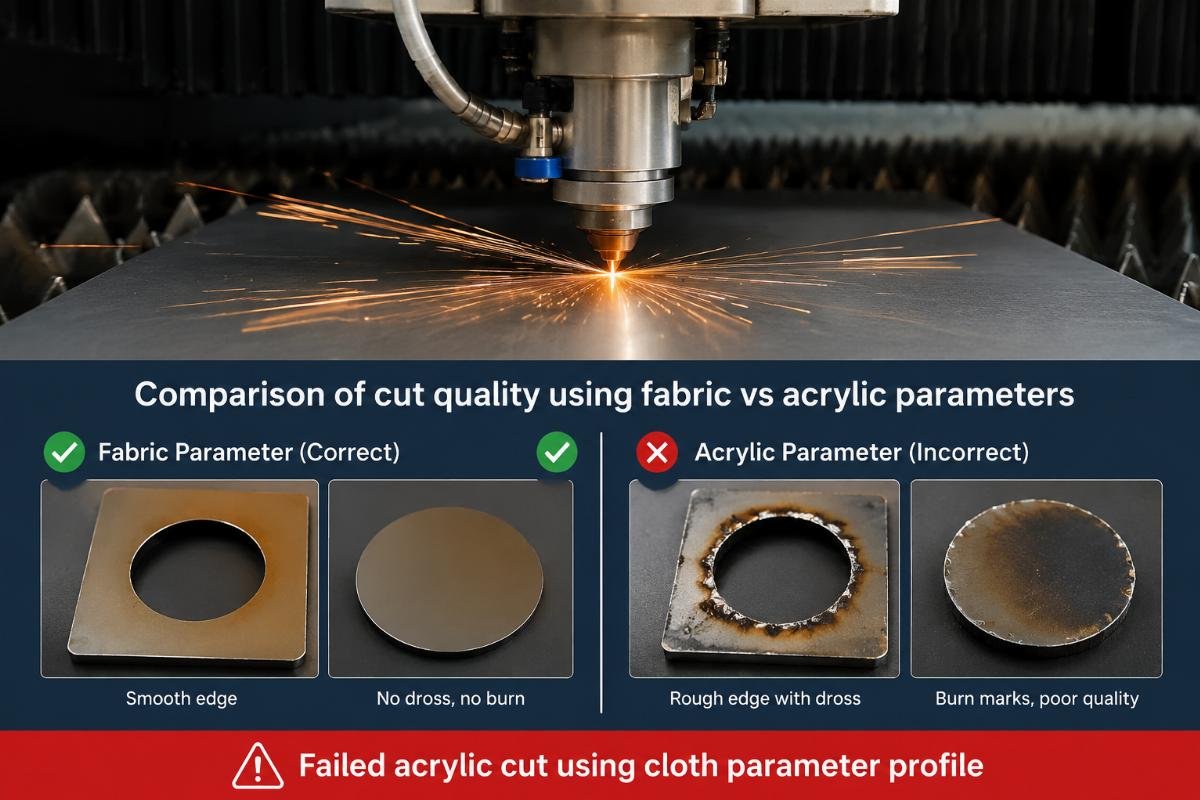
What Happens When You Use Cloth-Cutting Parameters on Thick Acrylic?
Cloth parameters assume the material will deform and forgive position errors9. Acrylic does not deform—it resists, and when the blade cannot cut through resistance, it either skips across the surface or carves the wrong path. Pressure, speed, and depth values for fabric are typically too low for rigid plastics, and corner logic designed for flexible materials will fail when the material pushes back instead of yielding.
Do not copy parameter sets between material types—test thick acrylic with higher pressure, slower corner speed, and lower lift height than fabric, then save a separate profile for rigid materials so you do not accidentally load the wrong settings.
Why Do Fabric Parameter Profiles Fail on Rigid Materials?
Fabric cuts with low pressure because the blade only needs to separate fibers, not shear through solid material. Acrylic requires the blade to penetrate and displace material continuously under load10. If you set pressure for fabric—around 150g to 200g—the blade will skip or deflect when it hits the rigid surface, especially at corners where resistance peaks during direction changes.
A customer imported their cotton cutting profile into an acrylic job without adjusting parameters. First part came off the table with half the corners incomplete and the rest overcut. I pulled the parameter file—pressure was 180g, corner speed was 200mm/s, lift height was 1mm. I switched to their acrylic profile—pressure 280g, corner speed 60mm/s, lift 0.4mm—and reran the file without changing blade or material. Parts came out clean. Same machine, same blade, different parameter logic.
Speed settings for fabric assume the blade can slide through material with minimal resistance. On acrylic, the blade must cut, not slide. High speed at corners means the blade is dragged sideways before it can pivot, creating overcut. Lift height for fabric is generous because fibers are forgiving—you can lift 1mm and still reengage cleanly. Acrylic has no give, so when you lift too high, springback has already moved the material slightly, and the blade reenters at the wrong position.
Save separate profiles labeled by material and thickness—"Cotton 2mm," "Acrylic 8mm," "Leather 4mm"—and load the correct profile before starting production. Do not edit profiles during a job unless you are testing adjustments. Keep a parameter sheet with verified settings for each material so operators do not have to guess.
| Material Type | Pressure (g) | Corner Speed (mm/s) | Lift Height (mm) | Expected Outcome |
|---|---|---|---|---|
| Cotton fabric 2mm | 180 | 200 | 1.0 | Clean cuts, no failures |
| Acrylic 6mm | 260 | 70 | 0.4 | Clean cuts, no failures |
| Acrylic 6mm (using fabric profile) | 180 | 200 | 1.0 | Overcut corners, random lift |
| Acrylic 10mm | 320 | 50 | 0.3 | Clean cuts, higher wear |
If you must cut multiple materials in one shift, verify the parameter profile every time you switch material types. I have seen operators load the wrong profile and ruin an entire sheet before noticing—it costs more than the two minutes it takes to check settings. Keep profiles locked so they cannot be accidentally edited, and require operators to select by name, not by memory.
How Do You Verify If a Corner Adjustment Actually Improved Cut Quality?
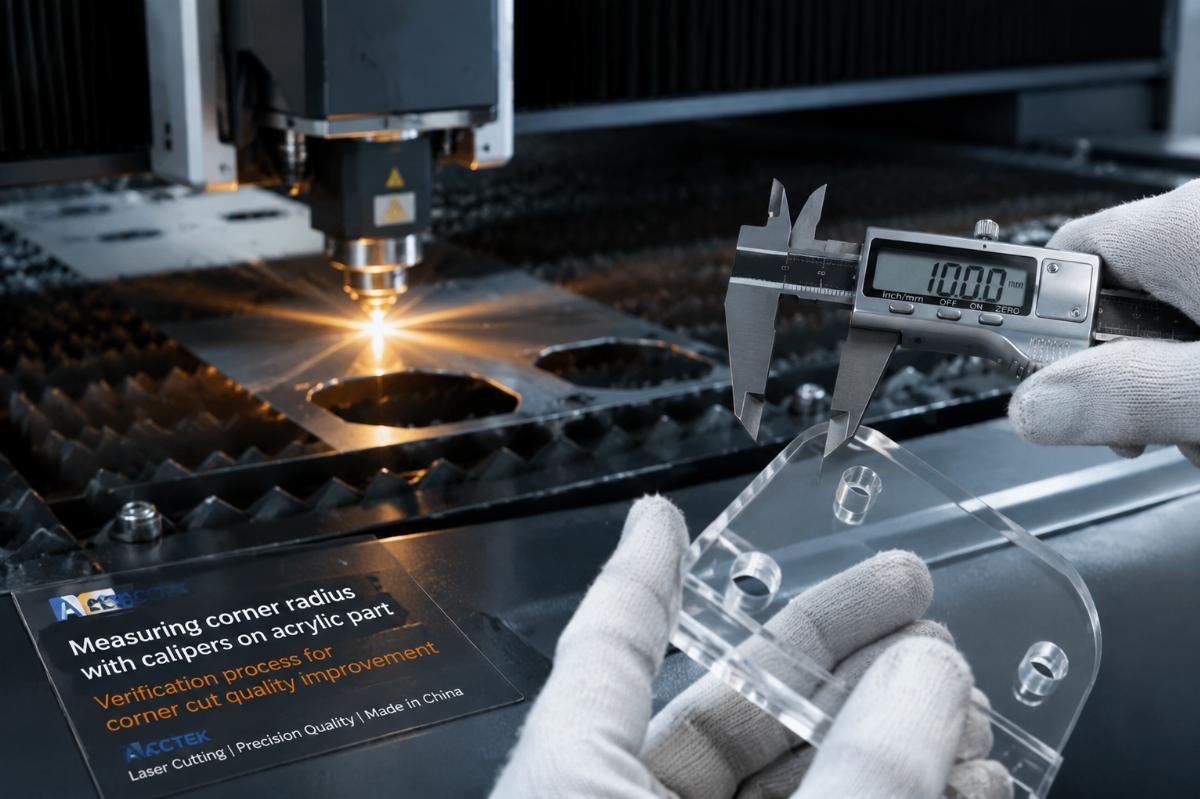
Measuring improvement is not subjective—cut the same corner twice with different settings and compare the geometry. If you cannot measure the difference, the adjustment did not work or was too small to matter. Verification means using calipers or a radius gauge to check if the cut corner matches the programmed corner within your tolerance, not just looking at it and deciding it "seems better."
Cut a test corner with your baseline settings, measure the radius or position error with calipers, adjust one parameter, cut the same corner again, and measure—if the error decreased, keep the adjustment; if it increased or stayed the same, revert and try a different parameter.
What Tools and Methods Confirm Quality Change?
Digital calipers measure corner position error by comparing actual cut coordinates to programmed coordinates11. Set your CAD origin at a reference edge, measure from that edge to the cut corner, and compare to the programmed distance. If the cut is 0.5mm off, you have a 0.5mm error to fix. Adjust parameters, recut, and measure again—if error drops to 0.2mm, the adjustment worked.
Radius gauges verify corner sharpness when you program a sharp 90-degree corner but get a rounded result12. Blade overcut creates a visible radius even when the path should be angular. A 0.5mm radius gauge that fits into the cut corner means you have a 0.5mm overcut problem. Reduce corner speed, increase compensation offset, and recut—if the gauge no longer fits, the radius is smaller and the corner is sharper.
I worked with a signage shop cutting acrylic letters. They complained corners were "not sharp enough" but had no measurements. I cut a test letter, measured the inside corners with a radius gauge—2.2mm radius when the design called for 0.5mm. I dropped corner speed from 100mm/s to 60mm/s and increased corner compensation offset from 1.5mm to 2.2mm. Recut the same letter, measured again—radius was 0
"[PDF] Working with Acrylic.. - Caltech", https://www.dna.caltech.edu/~nick/Working%20with%20Acrylic.pdf. Acrylic (polymethyl methacrylate) is a rigid thermoplastic with a tensile modulus of approximately 3,000 MPa, which resists blade penetration through elastic and plastic deformation mechanisms, unlike woven textiles that separate along fiber boundaries under low shear forces. Evidence role: mechanism; source type: encyclopedia. Supports: Acrylic (PMMA) exhibits rigid mechanical properties that resist deformation during cutting operations. Scope note: This describes general material properties rather than specific drag knife cutting behavior ↩
"Donek Tools: The Original and Authentic Drag Knife for CNC Routers", https://donektools.com/. Tangential cutting tools experience following error at path discontinuities because the blade must physically rotate to align with the new cutting direction while the tool holder continues along the programmed path, creating temporary positional deviation that increases with cutting speed and material resistance. Evidence role: mechanism; source type: education. Supports: Drag knives exhibit following error during direction changes due to mechanical offset and rotational inertia. Scope note: This addresses general tangential tool behavior rather than acrylic-specific cutting dynamics ↩
"[PDF] Localized Deformation in Plastic Liquids on Elastomers", https://dash.harvard.edu/bitstreams/7312037e-78c4-6bd4-e053-0100007fdf3b/download. PMMA (acrylic) has a compressive strength of approximately 120 MPa and an elastic modulus of 2.4-3.4 GPa, resulting in minimal elastic deformation under localized cutting forces compared to elastomeric or fibrous materials that accommodate blade penetration through compression or fiber displacement. Evidence role: mechanism; source type: encyclopedia. Supports: Acrylic exhibits minimal elastic compression under typical cutting forces due to its high elastic modulus. Scope note: This describes bulk material properties rather than behavior under specific drag knife cutting conditions ↩
"(PDF) Tool-Workpiece Interaction in the Cutting Process and Its Use", https://www.academia.edu/93216083/Tool_Workpiece_Interaction_in_the_Cutting_Process_and_Its_Use. When a cutting tool changes direction while engaged with a rigid workpiece, the tool tip acts as a fulcrum point, with lateral forces from the tool holder creating a moment arm that can cause tool deflection or workpiece displacement, particularly when material stiffness exceeds tool holder rigidity. Evidence role: mechanism; source type: education. Supports: Cutting tools experience lever-like mechanical forces when pivoting against rigid workpiece surfaces. Scope note: This describes general cutting mechanics rather than drag knife-specific behavior in acrylic ↩
"[PDF] Computer-numerical-control-algorithms.pdf", https://faculty.engineering.ucdavis.edu/farouki/wp-content/uploads/sites/41/2013/02/Computer-numerical-control-algorithms.pdf. Corner compensation in CNC systems applies geometric transformations to programmed tool paths during the preprocessing phase, adjusting corner coordinates to account for tool offset, radius, and following error, ensuring that the actual cut geometry matches design intent despite physical tool characteristics. Evidence role: mechanism; source type: education. Supports: CNC corner compensation algorithms modify programmed coordinates during path preprocessing to account for tool geometry and offset. Scope note: This describes general CNC compensation principles rather than drag knife-specific implementations ↩
"Drag Knife on CNC - YO! Asmbly", https://yo.asmbly.org/t/drag-knife-on-cnc/2663. Drag knives (also called tangential or swivel knives) are designed with a pivot point offset from the blade tip, causing the blade to passively rotate and trail behind the direction of motion through friction and material resistance, maintaining tangential alignment with the cutting path without active rotation control. Evidence role: mechanism; source type: education. Supports: Drag knives maintain a trailing orientation through passive rotation mechanisms. ↩
"Thickness tolerances for Acrylic sheet - U.S. Plastic Corp.", https://www.usplastic.com/knowledgebase/article.aspx?contentkey=768&srsltid=AfmBOoo3APLkfQh5hqCSR3451iWMfK_upr3lvr4tq7TFX_4M20aEnSUz. Industry standards for cast acrylic sheet specify thickness tolerances that typically range from ±10% for sheets under 6mm to ±0.4mm for thicker sheets, with additional variation possible across sheet dimensions due to manufacturing processes such as casting, cooling, and handling, resulting in measurable thickness differences within individual sheets. Evidence role: statistic; source type: institution. Supports: Acrylic sheet manufacturing tolerances include thickness variation across sheet dimensions. Scope note: Tolerance ranges vary by manufacturer, production method (cast vs extruded), and sheet thickness ↩
"PMMA - MIT", https://www.mit.edu/~6.777/matprops/pmma.htm. PMMA exhibits viscoelastic behavior with elastic recovery following deformation, characterized by an elastic modulus of 2.4-3.4 GPa and recovery time dependent on stress magnitude and duration; during cutting operations, localized compression from tool forces produces elastic deformation that partially recovers after tool passage, creating springback forces that can affect dimensional accuracy. Evidence role: mechanism; source type: encyclopedia. Supports: Acrylic demonstrates elastic recovery after localized compression from cutting tools. Scope note: Recovery behavior depends on cutting speed, temperature, and stress magnitude, which vary by specific cutting conditions ↩
"[PDF] Mechanical Behavior of Woven Fabrics - DSpace@MIT", https://dspace.mit.edu/bitstream/handle/1721.1/89902/53282217-MIT.pdf?sequence=2&isAllowed=y. Woven and knitted textiles exhibit low bending rigidity and high conformability, allowing fabric structures to deform around cutting tools through fiber displacement and yarn mobility; this deformation capacity permits successful cutting with lower positioning accuracy and tool pressure compared to rigid materials, as the fabric structure accommodates tool path deviations through local deformation rather than requiring precise tool positioning. Evidence role: mechanism; source type: education. Supports: Textile materials accommodate cutting tool positioning variations through fiber mobility and fabric deformation. Scope note: This describes general textile behavior rather than specific cutting parameter design principles ↩
"Impact of CNC Milling Parameters on Temperature, Surface ...", https://www.academia.edu/85055667/Impact_of_CNC_Milling_Parameters_on_Temperature_Surface_Roughness_and_Chip_Formation_of_General_Purpose_PMMA. Cutting rigid thermoplastics like PMMA involves shear-dominated material separation where the cutting edge must continuously penetrate the material and generate plastic deformation ahead of the tool, displacing material through chip formation or fracture propagation, requiring sustained cutting forces throughout the tool path unlike fibrous materials that separate through fiber severing with minimal displacement. Evidence role: mechanism; source type: education. Supports: Acrylic cutting involves shear-based material separation through continuous blade penetration. Scope note: Specific cutting mechanisms vary with tool geometry, cutting speed, and material temperature ↩
"[PDF] Coordinate measuring machines : a modern inspection tool in ...", https://digitalcommons.njit.edu/cgi/viewcontent.cgi?article=2245&context=theses. Digital calipers with resolution of 0.01mm or better can measure linear dimensions and coordinate positions on cut parts by referencing from established datum edges, enabling comparison between actual cut geometry and programmed dimensions to quantify positional errors, though measurement uncertainty increases with part complexity and reference surface quality. Evidence role: general_support; source type: education. Supports: Calipers provide dimensional measurement for verifying cutting accuracy against programmed values. Scope note: Caliper measurements are limited to accessible features and require proper datum reference establishment ↩
"How does one accurately measure a rounded corner for a 3d model?", https://www.reddit.com/r/3Dprinting/comments/1i3mjz6/how_does_one_accurately_measure_a_rounded_corner/. Radius gauges (fillet gauges) consist of precision-ground templates with known radii that can be physically compared against cut corners to determine the actual corner radius through fit testing; when a programmed sharp corner exhibits rounding due to tool path errors or tool geometry, radius gauges identify the magnitude of unwanted radius, enabling quantitative assessment of corner quality and parameter adjustment effectiveness. Evidence role: general_support; source type: education. Supports: Radius gauges provide tactile measurement of corner radii to assess cutting accuracy. Scope note: Radius gauge measurement requires physical access to the corner and provides discrete rather than continuous measurement values ↩